How to add discounts to an invoice
Whether you're rewarding a loyal customer or knocking a fixed amount off a service, Apollo lets you apply a discount to any line on an invoice or estimate. Each line's discount is independent, so you can discount some items and leave others at full price on the very same document.
- 1
Add or open an item line#
On the invoice form, under Items, fill in a line the usual way with a Name, Quantity and Price. The Discount field sits right next to the tax controls on the same row.
- 2
Choose percentage or fixed amount#
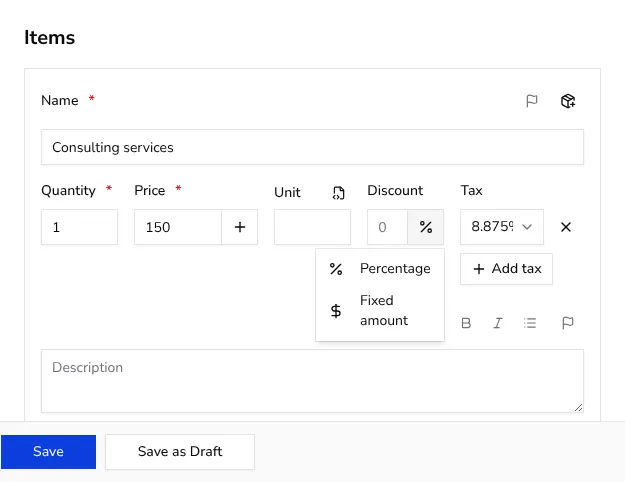
Click the small icon button next to the Discount field to pick how the discount is calculated: Percentage takes a percent off that line's price, and Fixed amount subtracts a flat sum in the invoice's currency instead.
![Dropdown menu next to the Discount field with Percentage and Fixed amount options]()
- 3
Enter the discount value#
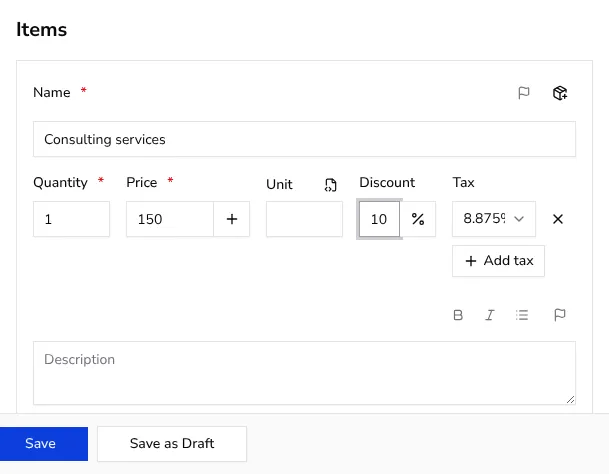
Type the number into the Discount field: for example, 10 with Percentage selected takes 10% off that line, while 10 with Fixed amount selected takes off 10 units of currency exactly, whatever the currency of the document is.
![Item row with a discount value entered next to the price and quantity fields]()
- 4
Check the effect in the preview#
The live preview on the right recalculates the line and the document totals as soon as you enter a value, so you can confirm the discounted price looks right before you save. Once you issue the document, the combined discount from every line appears as a single Discount row in the totals.
- 5
Repeat for any other line#
Every line has its own Discount field, so add a percentage discount to one item and a fixed amount to another on the same invoice if that's what the deal calls for.
Tips
- There's no separate discount field for the whole document; every discount is set line by line, and the totals add them up for you.
- A discount only affects the line you set it on, so double-check each line if you meant to discount the whole order rather than one item.
- Discounts work the same way on estimates as on invoices, so you can quote a discounted price before it ever becomes an invoice.
Frequently asked questions
Can I give a discount on the whole invoice instead of one line?
There isn't a single whole-document discount field; add the same percentage or fixed amount to each line instead, and the totals will reflect it together.
Does a percentage discount apply before or after tax?
The discount reduces that line's price before tax is calculated on it, and the live preview shows you the resulting totals as you type.
Can I remove a discount after adding it?
Yes, clear the value in the Discount field and the line goes back to its full price.
Will the customer see how the discount was calculated?
The invoice shows the discounted totals; if you want the customer to see the exact percentage or reason, add that to the item description or an invoice note.