How to find property data for your FURS business premise
To register a real-estate FURS business premise (a physical location like an office or shop), Apollo needs three details from the land register: the cadastral number, building number and building section. You can look them up for free, with no login, in the GURS public property viewer (Javni vpogled). Movable premises (vehicles, market stalls) don't need this data. Using a public office building as an example, this guide shows how to find the numbers and enter them in Apollo.
- 1
Open the GURS viewer and search for the address#
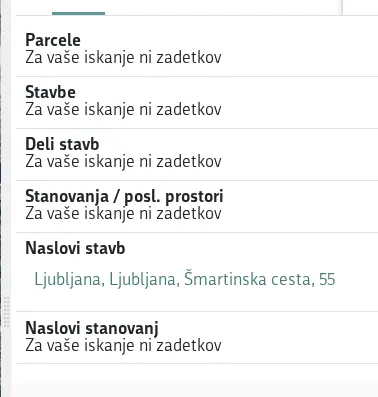
Open https://ipi.eprostor.gov.si/jv/ and click VSTOPI V APLIKACIJO (Enter the application) on the intro screen. The viewer is free, needs no login, and is in Slovenian only. Type your address into the Iskanje (Search) field at the top right (for example "Šmartinska cesta 55") and press Enter.
![GURS Javni vpogled search results grouped by type, with the Šmartinska cesta 55 building listed under Naslovi stavb]()
- 2
Open the building and read its cadastral and building numbers#
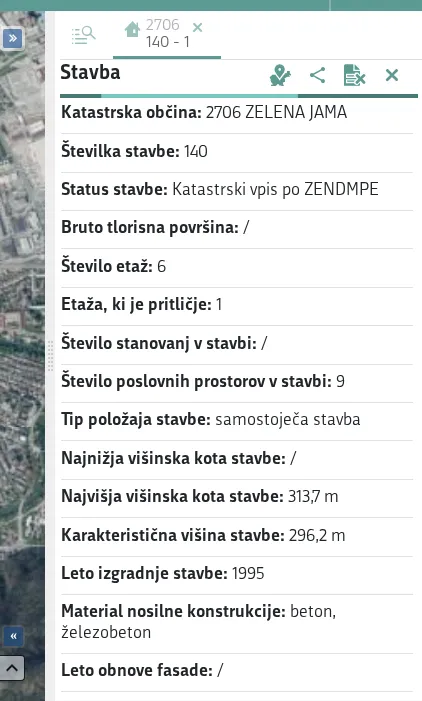
Under Naslovi stavb (Building addresses), click your address (for example "Ljubljana, Ljubljana, Šmartinska cesta, 55"). The map zooms in and a Stavba (Building) panel opens on the right, showing Katastrska občina (Cadastral community, for example "2706 ZELENA JAMA" — the number followed by the name) and Številka stavbe (Building number, for example 140).
![Stavba panel in the GURS viewer showing Katastrska občina 2706 ZELENA JAMA and Številka stavbe 140, next to the map]()
- 3
Find the building part where you do business#
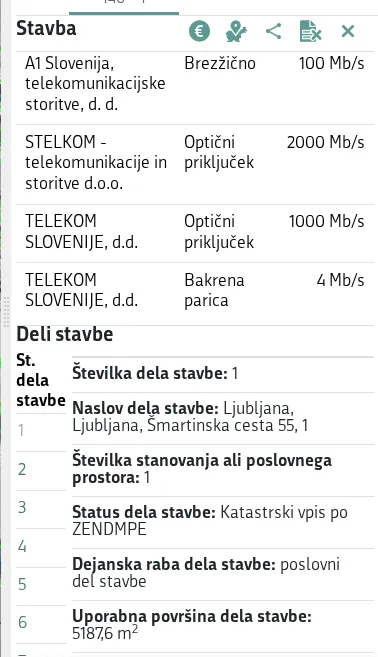
Scroll the panel down to Deli stavbe (Building parts). It lists Št. dela stavbe (part number: 1, 2, 3…), and each part shows its Številka dela stavbe, Naslov dela stavbe, Številka stanovanja ali poslovnega prostora and Dejanska raba dela stavbe (actual use, for example "poslovni del stavbe" — business part of the building). Pick the part that matches where your business operates.
![Deli stavbe list in the GURS viewer showing building part numbers and their actual use]()
- 4
Enter the numbers in Apollo#
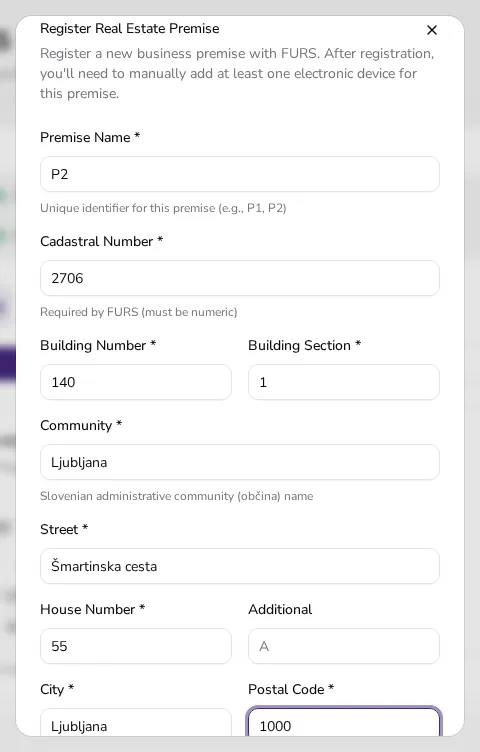
In Apollo, open Settings → FURS → the Business Premises tab and click Add Real Estate. In the Register Real Estate Premise dialog, enter the Cadastral Number as just the number — 2706, not "ZELENA JAMA" — the Building Number as 140 and the Building Section as 1, plus the address fields (Street Šmartinska cesta, House Number 55, City Ljubljana, Postal Code 1000). Then click Register Premise to register it with FURS. After registration, add at least one electronic device to the premise.
![Register Real Estate Premise dialog in Apollo filled with cadastral number 2706, building number 140 and building section 1]()
- 5
Know when you don't need this data#
Movable premises — a vehicle, a market stall or other movable premise — don't need a cadastral number, building number or building section at all. When you click Add Movable instead, you enter a premise name and choose the premise type.
Tips
- Search with the exact street name and house number; find your address under the Naslovi stavb group in the results.
- Enter only the number in Apollo's Cadastral Number field (e.g. 2706) — not the community name (ZELENA JAMA) the viewer shows next to it.
- For a movable premise (vehicle, market stall), skip this lookup entirely — use Add Movable, enter a premise name and choose the premise type instead.
Frequently asked questions
What do Cadastral Number and Building Number mean?
They're identifiers from the GURS land register that identify the building where you do business; FURS requires them to register a real-estate business premise.
Do I also enter the cadastral community's name (e.g. ZELENA JAMA) in Apollo?
No. Apollo's Cadastral Number field takes only the number (for example 2706); the name shown next to it in the GURS viewer isn't needed.
Does the GURS Javni vpogled viewer require a login or offer English?
No, it's free and needs no login, but it's only available in Slovenian.
Do movable business premises need this property data?
No. Movable premises (vehicles, market stalls) don't need a cadastral number, building number or building section in Apollo — you enter a premise name and pick the premise type.